
Both are on Plan & usage, and you need to be on a paid plan first.
Add-ons
Need a few more promoter accounts, admins and managers, active activations or active brands, but not a bigger plan? Buy them as add-ons.
- Under Add-ons, use − and + to choose how many of each you need.
- Check the amount due now, and click Pay for add-ons.
- Pay on the Paystack page.
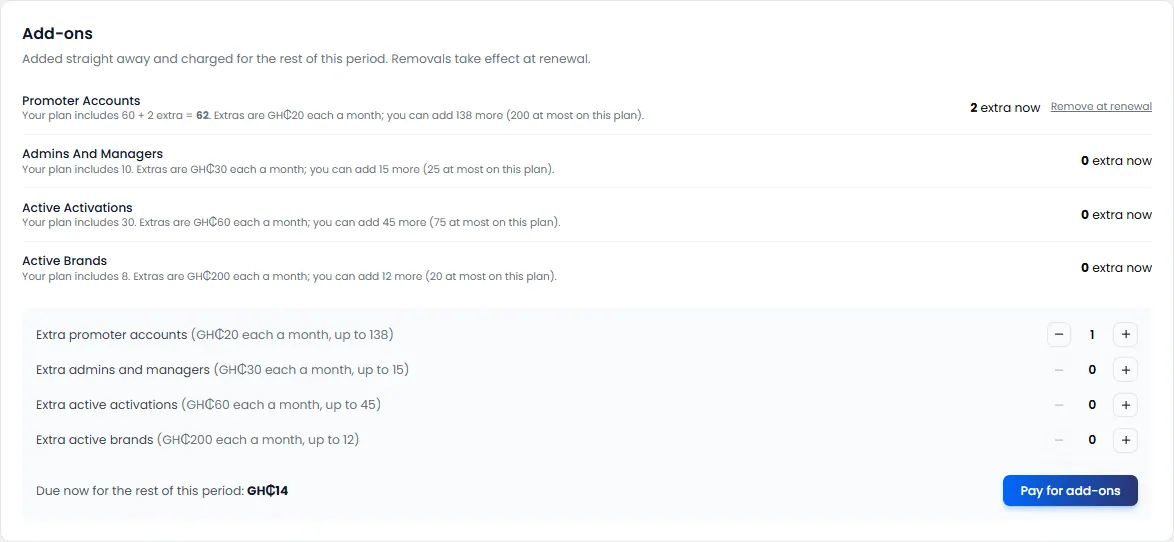
Add-ons work straight away. You pay for the rest of this period, then they renew with your plan.
Remove an add-on
Click Remove at renewal next to it. It stays until your plan renews.
Promo item SMS
Every promo item and game prize code goes to the shopper by SMS. Your plan includes a monthly allowance. Used this month shows how much you've used.
When it's running out, buy a pack:
- Under Promo item SMS, choose a pack.
- Click Pay for SMS, and pay.
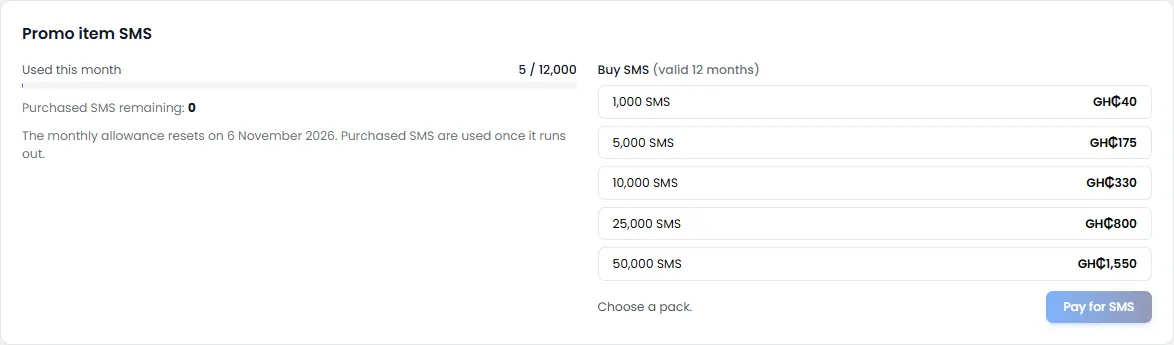
Purchased SMS last 12 months. They're used only once your monthly allowance runs out. The allowance resets each month on your renewal date.