← Back to Reference

Moments Analytics Help

Reference

Who can do what, the words we use, every message we send, and what to do when something goes wrong.

Everyone · 20 October 2026 · momentsanalytics.com/help/reference

  1. 1. If something goes wrong
  2. 2. Who can do what
  3. 3. Glossary
  4. 4. Every SMS and email we send

1 of 4

If something goes wrong

Every message and problem covered in this help, in one place.

Find the message you see, or the problem you have, and open its page. Each page says what it means and what to do.

Still stuck? Promoters can ask their manager. Admins can email support@momentsanalytics.com.

Signing in and your account

You seeWhat it means
"Access Denied", signed out, or a list won't loadPages you might land on, and what to do about each one.
I can't sign inWhat each sign-in message means, and what to do about it.

Promoter Portal

You seeWhat it means
A button is greyed outWhy you can't record a sale, give a promo item or play games right now.
"Games aren't on right now"The game screen can't show games because the activation is paused, ended or not started.
"Location off"Your browser is blocking your location, so your records don't show where they happened.
"No games are on in this activation"Your manager hasn't switched on any games for this activation yet.
"Paused: subscription expired"Your organisation's subscription has run out, so sales, promo items and games are paused.
Red messages on the sale formWhat each red message on Record a sale means, and how to fix it.
"That code is not correct"The promo item code doesn't match the one sent to the shopper.
"That code isn't right"The sign-in code you typed doesn't match the one we sent.
"That code wasn't found"The prize code doesn't match any prize won in this activation.
"That transaction ID is already used by another sale"Each payment can be recorded once. This transaction ID is already on another sale.
"The SMS could not be sent"The promo item was created, but its code SMS didn't go out.
"This code has expired"The shopper's promo item code is too old to use. Send a new one.
"This number has already received a product sample"Each person gets one product sample in each activation.
"This number has already won" or "already played"The shopper has reached the game's limit for wins or plays.
"Transaction ID is required"Mobile Money and card sales need the transaction ID from the payment.
"You've been signed out"Your session ended, so you need to sign in again. Nothing you saved is lost.

Admin Portal

You seeWhat it means
Errors when creating an activation or gameWhat each message on the activation and game forms means, and how to fix it.
You've reached a plan limitWhat to do when your plan stops you adding something, or a feature needs a bigger plan.

Viewers Portal

You seeWhat it means
"This campaign isn't available"The report you opened has been removed, or is no longer shared with you.

Game screen

You seeWhat it means
Game screen problemsWhat each message on the game screen means, and what to do.

Playing on your phone

You seeWhat it means
Problems with a game link or Mystery BoxWhat each message means when you play on your phone, and what to do.

2 of 4

Who can do what

The roles in Moments Analytics, where each one signs in, and what each can see and change.

Everyone in Moments Analytics has one role. Your role decides:

  • which portal you sign in to;
  • what you see in the menu;
  • what you can change.

The roles

RoleSigns in toSigns in withWho adds them
Agency adminAdmin PortalEmail and passwordSelf sign-up, or another agency admin
Agency managerAdmin PortalEmail and passwordAn agency admin
Agency promoterPromoter Portal, Games PortalPhone number and an SMS codeAn agency admin
Brand adminAdmin PortalEmail and passwordSelf sign-up, or another brand admin
Brand managerAdmin PortalEmail and passwordA brand admin
Brand promoterPromoter Portal, Games PortalPhone number and an SMS codeA brand admin
Brand viewerViewers PortalEmail and passwordAn agency admin or a brand admin

Brand admins, managers and promoters exist only for standalone brands, which run their own activations. When an agency runs a brand, the agency's team does the work. The brand's own people are added as brand viewers.

Shoppers don't have an account. They play with the phone number they give the promoter.

Only admins add people. If you're a manager and need someone added, ask your admin. Managers choose from existing promoters when they set up an activation.

What each role sees in the Admin Portal

MenuAgency adminAgency managerBrand adminBrand manager
Dashboard✓✓✓✓
Campaigns, Activations, Games✓✓✓✓
Sales, Promo items✓✓✓✓
Brands✓View only——
Users✓—✓—
My Business✓—✓—
Audit log✓—✓—
Plan & usage, Transactions, Invoices, Rentals✓—✓—

If you open a page your role doesn't include, you see Access Denied. Ask your admin if you need it.

Promoters

Promoters work only in the activations they're added to, and only while each activation is running. They can:

  • record sales, and edit or void their own sales from today;
  • ask for a correction to a sale from an earlier day;
  • give product samples and brand merchandise;
  • unlock games for shoppers, set up game screens and hand over prizes.

Brand viewers

Brand viewers see their own brand only: its dashboard, and the reports for each campaign and activation (sales, promo items, people reached and game plays). They can't change anything.

3 of 4

Glossary

The words Moments Analytics uses, and what each one means.

The words used across Moments Analytics and this help, in A to Z order. Each word means one thing only.

Activation
One event or promotion on the ground, such as a weekend of tastings at Accra Mall. It belongs to a campaign and has dates, one or more locations, promoters, products and, if you choose, games. Promoters record everything against an activation.
Activation code
A short code for an activation, for example SUNNY001. A promoter uses it to sign a game screen in.
Admin Portal
Where agencies and brands set up and run their work: campaigns, activations, games, users and billing. For admins and managers.
Agency
A company that runs activations for one or more brands. Its team works in the Admin Portal and the Promoter Portal.
Brand
A product's owner. A brand can run its own activations (a standalone brand), or have an agency run them. When an agency runs a brand, the brand's own people can be added only as brand viewers.
Brand merchandise
A branded giveaway, such as a cap or T-shirt. It's handed out with a code, like a product sample. See promo item.
Brand viewer
Someone at the brand, usually the client, who reads results in the Viewers Portal. They can't change anything.
Campaign
A brand's promotion as a whole, for example "Sunny Malt Summer Refresh". It holds one or more activations and their targets.
Cash-up
The end-of-day totals on the promoter's Dashboard. It shows the cash, Mobile Money and card collected, promo items given, and game plays. Use it when handing over at the end of the day.
Correction
A request to change a sale from an earlier day. The promoter asks, and an admin or manager approves or rejects it. A sale from today can be edited or voided directly instead.
Dashboard
The first page you see after you sign in. Promoters see today's cash-up, the stock left and a button for each job. Admins and managers see how all their work is going.
Game
Spin the Wheel, Trivia or Mystery Box, switched on for an activation with its prizes. A shopper plays only after a promoter unlocks a play for them.
Game screen
A tablet, TV or kiosk at the stand, showing the Games Portal, where shoppers play. A promoter sets it up with a screen code.
Game wins
The list of prizes won, and whether each one has been handed over.
Games Portal
What runs on the game screen, and on the shopper's phone when they play from an SMS link.
Location
A place where an activation happens, for example Accra Mall. An activation can have several. Promoters choose where they're working each day.
Manager
The person who runs a promoter's activations and answers their questions. It can be the agency's or brand's manager, or its admin. Promoters always say "your manager", never "team lead" or "supervisor".
Mystery Box
A game where the shopper picks a box to open. It's played on the game screen, from an SMS link, or by tapping a physical box with their phone (NFC, or its QR code).
A sale's payment status. A sale waiting for payment doesn't count towards targets until it's marked Paid.
Plan & usage
Your subscription plan, and how much of it you've used: activations, users, SMS and so on.
Play
One turn at a game for one shopper. A promoter unlocks it for the shopper's phone number. It waits 10 minutes on a game screen, or 30 minutes when it's sent by SMS link.
Prize code
The code a winner gets on screen and by SMS. They show it to a promoter to collect their prize.
Product sample
A free product, such as a small bottle to taste, handed out with a code. See promo item.
Promo item
Anything given away free: a product sample or brand merchandise. The shopper gets a code by SMS, and the promoter enters it to hand the item over. One sample per person in each activation.
Promoter
The person at the stand who records sales, gives promo items and unlocks games. They sign in to the Promoter Portal with their phone number and an SMS code.
Promoter Portal
The promoter's app, on their phone. It can be added to the home screen like an app.
Recovery codes
One-time codes for signing in when you can't get your two-step sign-in code. You save them when you turn two-step sign-in on.
Rental
Equipment hired from Moments Analytics for an activation, such as a canopy tent or a banner stand. Admins request rentals in Rentals.
Screen code
The code a promoter types on a game screen to set it up. It lasts 10 minutes.
Stock
How many of each product an activation has left to sell or give away. A product with none left can't be chosen.
Two-step sign-in
Signing in with your password and a code sent by email or SMS. An admin can require it for everyone in their organisation.
Viewers Portal
Where brand viewers read their campaign and activation results.
Void
To cancel a sale from today, with a reason. A voided sale stays in the history but doesn't count.

4 of 4

Every SMS and email we send

What Moments Analytics sends, to whom, and when, so you know what's genuine.

Use this page to check whether a message is really from us.

  • Emails come from no-reply@momentsanalytics.com. If you reply, it goes to support@momentsanalytics.com.
  • SMS come from the sender name Moments.

SMS

SMSWho gets itExample
Sign-in codePromoters, when they sign in"Your Moments Analytics code to sign in is 123456. It expires in 10 minutes. Don't share it with anyone."
Two-step sign-in codeAnyone who chose SMS for two-step sign-inThe same, "to sign in" or "to turn on two-step sign-in"
Phone confirmationSomeone signing up"Your Moments Analytics code to confirm your phone is 123456. It expires in 10 minutes."
Promo item codeA shopper getting a sample or merchandise"Your Sunny Malt code for Accra Mall Tasting & Sales is 123456. Give it to the promoter to collect your …"
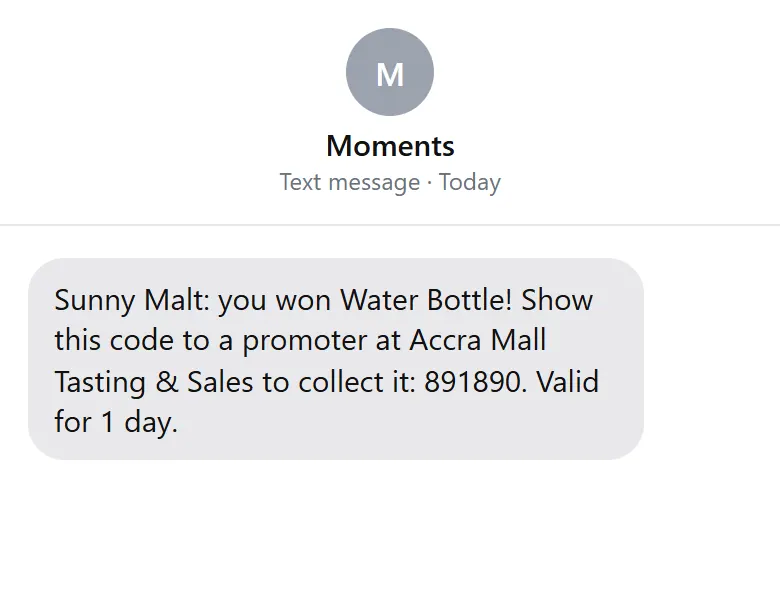
Prize codeA shopper who won a game"Sunny Malt: you won … ! Show this code to a promoter at … to collect it: …"
Game linkA shopper playing on their own phone"Sunny Malt: your spin is ready! Play Sunny Spin here: … (valid 30 minutes)"
A prize code by SMS
A prize code by SMS

Emails about your account

EmailWhen
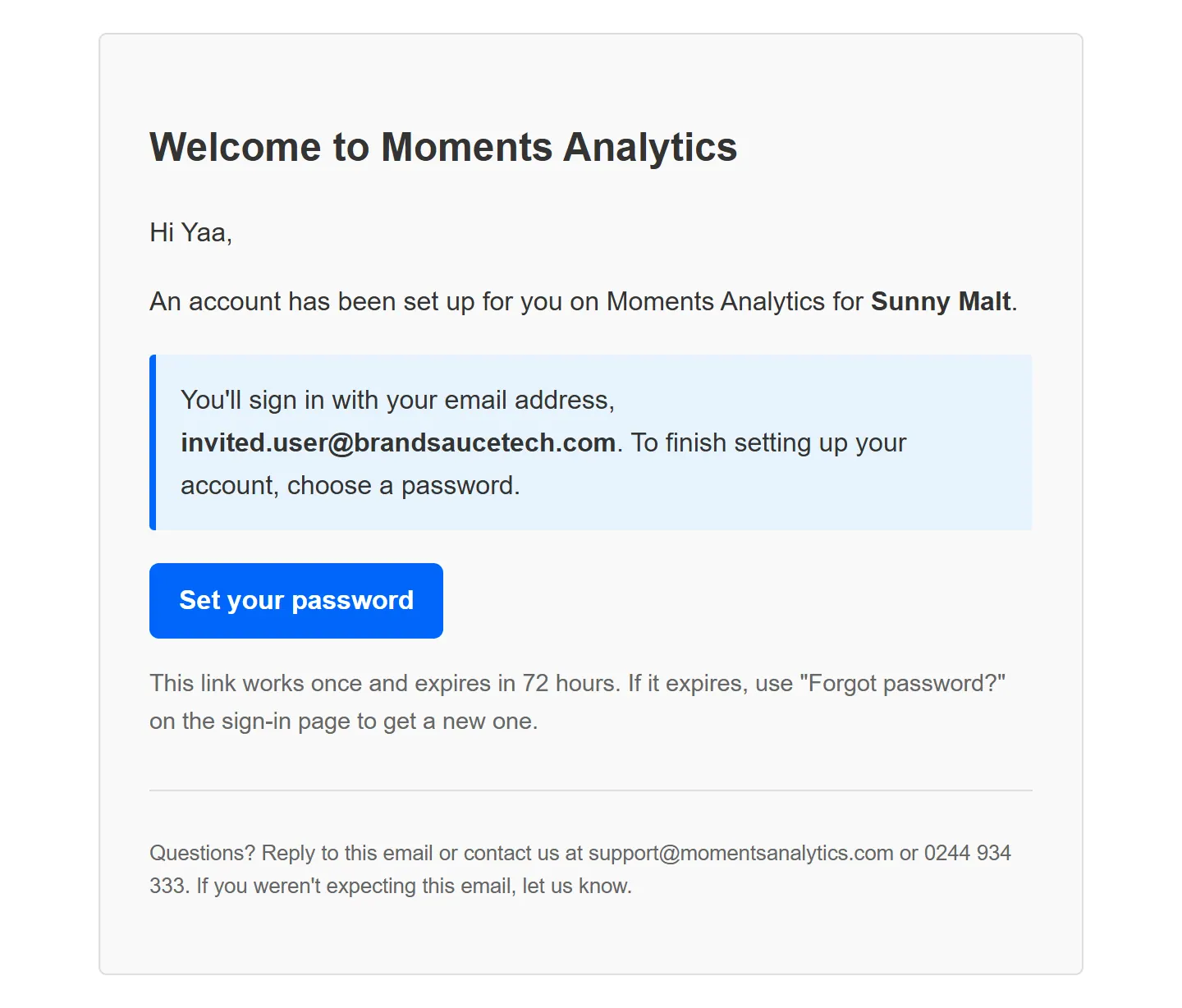
Welcome to Moments Analytics: set up your accountAn admin added you. The link lasts 72 hours
Welcome to Moments AnalyticsYou signed up yourself, or you were added as a promoter
Your Moments Analytics codeA code to sign up, or for two-step sign-in by email
Reset your Moments Analytics passwordYou asked to reset it. The link lasts 30 minutes
Your Moments Analytics password was changedYour password changed. If it wasn't you, reset it now
Your Moments Analytics sign-in has been locked5 wrong passwords in a row
Two-step sign-in is onTwo-step sign-in was turned on for your account
Welcome email for a new user

Emails about your plan and payments

Sent to your business email (set in My Business) and your organisation's admins.

EmailWhen
Your 14-day free trial has startedYou signed up
Your trial ends in 3 days / Your trial has endedNear and at the end of the trial
Payment receiptEvery successful payment, with the invoice number
Your … subscription renews in 7 daysBefore renewal. Pay by Mobile Money or bank transfer, or your saved card is charged
Your subscription payment is overdueRenewal wasn't paid
Your subscription is in its grace periodThe last days before the account becomes read-only
Final reminder: your account becomes read-only tomorrowThe day before
Your subscription has endedIt wasn't renewed
You're at 80% of your … limit / You've reached your limit of …A plan limit is nearly or fully used
You've used 80% of your promo item SMS / … used upThe month's SMS allowance is running out, or gone
… promo item SMS expire on …A purchased SMS pack is about to expire

Emails about rentals

Sent to your organisation's contact email at each step: requested, approved: payment due, equipment handed over, due back tomorrow, overdue, returned, completed and cancelled. Each subject starts with the rental number, for example "Rental RNT-202610-0002 approved: payment due".

Emails from the website

When you send an enquiry on momentsanalytics.com, you get a copy: We've got your request. Our team replies by email.

Documents