
This page is for brands that run their own activations, without an agency. If an agency runs yours, you're probably a brand viewer. See Welcome to your Viewers Portal.
A brand works in the Admin Portal much like an agency. There are two differences:
- you don't add brands, because your account is the brand;
- your team has brand roles.
1. Sign up
Choose Brand under Registering as. See Sign up for a free trial.
2. Check your business details
See Update your business details.
3. Add your team
In Users, click Add User and choose a brand role:
| Role | What they do |
|---|---|
| Brand Admin | Everything, including billing and users |
| Brand Manager | Run campaigns, activations and games |
| Brand Promoter | Work at the stand, on their phone. They sign in with their phone number |
| Brand Viewer | See the reports in the Viewers Portal, for example your marketing director |
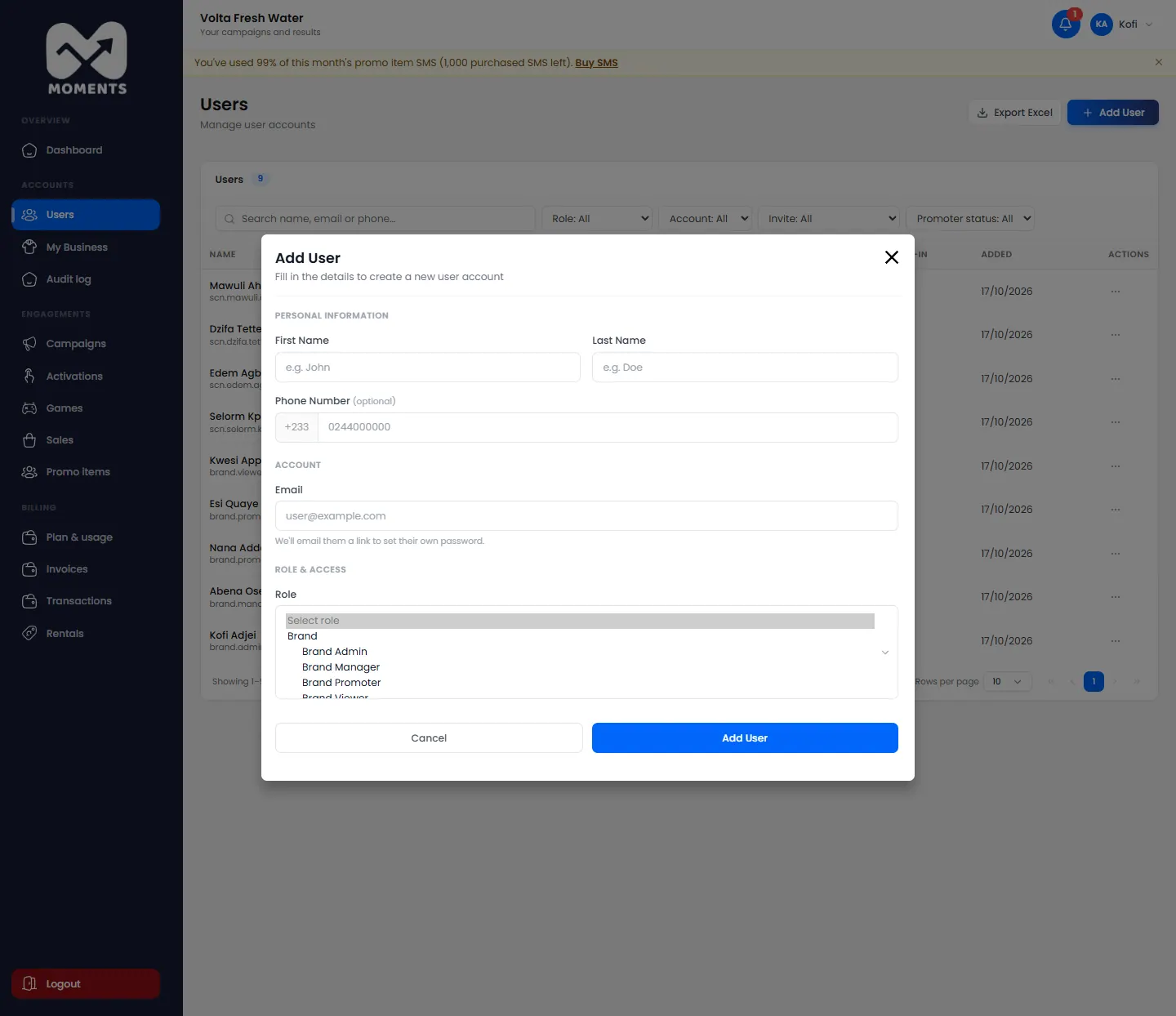
See Add a user.
4. Run your first activation
The steps are the same as for agencies:
- Create a campaign.
- Create an activation, then add products and promo items.
- Optional: add a game.
- Set the activation to Active, and follow it on your dashboard and in its campaign report.
5. Choose a plan before your trial ends
Brands have their own plans. See Choose or change your plan.